问题描述
在docker中部署mongodb,数据文件持久化到mac(我本机)中,测试发现,只要将数据文件目录放到docker中就没问题,一旦将文件放到通过docker -v命令挂载过来的文件夹中就回爆出如下错误:
docker启动命令:
docker run -it -v /Usr/happyhour7/code/data:/data mongodb /bin/bash
root@aba9b0873a23:/# mongod --dbpath=/data/db2017-01-05T08:40:32.211+0000 I CONTROL [initandlisten] MongoDB starting : pid=15 port=27017 dbpath=/data/db 64-bit host=aba9b0873a232017-01-05T08:40:32.211+0000 I CONTROL [initandlisten] db version v3.4.12017-01-05T08:40:32.211+0000 I CONTROL [initandlisten] git version: 5e103c4f5583e2566a45d740225dc250baacfbd72017-01-05T08:40:32.211+0000 I CONTROL [initandlisten] OpenSSL version: OpenSSL 1.0.2g 1 Mar 20162017-01-05T08:40:32.211+0000 I CONTROL [initandlisten] allocator: tcmalloc2017-01-05T08:40:32.211+0000 I CONTROL [initandlisten] modules: none2017-01-05T08:40:32.211+0000 I CONTROL [initandlisten] build environment:2017-01-05T08:40:32.211+0000 I CONTROL [initandlisten] distmod: ubuntu14042017-01-05T08:40:32.211+0000 I CONTROL [initandlisten] distarch: x86_642017-01-05T08:40:32.211+0000 I CONTROL [initandlisten] target_arch: x86_642017-01-05T08:40:32.211+0000 I CONTROL [initandlisten] options: { storage: { dbPath: '/data/db' } }2017-01-05T08:40:32.218+0000 I STORAGE [initandlisten] wiredtiger_open config: create,cache_size=489M,session_max=20000,eviction=(threads_max=4),config_base=false,statistics=(fast),log=(enabled=true,archive=true,path=journal,compressor=snappy),file_manager=(close_idle_time=100000),checkpoint=(wait=60,log_size=2GB),statistics_log=(wait=0),2017-01-05T08:40:32.229+0000 E STORAGE [initandlisten] WiredTiger error (22) 1483605632:229032, connection: /data/db/: directory-sync: fdatasync: Invalid argument2017-01-05T08:40:32.230+0000 I -[initandlisten] Fatal Assertion 28561 at src/mongo/db/storage/wiredtiger/wiredtiger_kv_engine.cpp 2642017-01-05T08:40:32.230+0000 I -[initandlisten]
*aborting after fassert() failure
我本机:mac,docker系统:ubuntu@14.04
问题解答
回答1:你是直接在MacBook上运行Docker吧?关于Volume官方文档是这样说的:
File sharing
You can decide which directories on your Mac to share with containers.
Add a Directory - Click + and navigate to the directory you want to add.
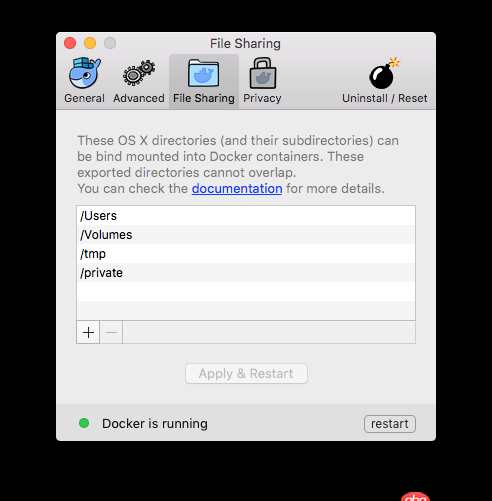
Click Apply & Restart to make the directory available to containers using Docker’s bind mount (-v) feature.
意思是你需要先配置Docker,然后才能使用Volume
参考:Get started with Docker for Mac