当大家自己的手机暂时不方便接电话时,可以把手机号码转接到其他的手机上面,那么opporeno5pro怎么设置呼叫转移呢?
品牌型号:opporeno5pro
系统版本:ColorOS 11
opporeno5pro怎么设置呼叫转移1、打开手机拨号,点击【:】图标,点击【设置】,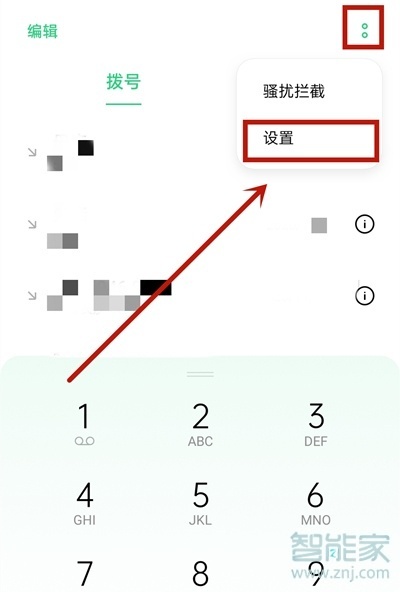
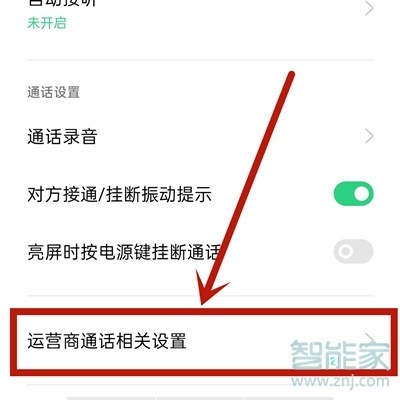
2、点击【运营商通话相关设置】,
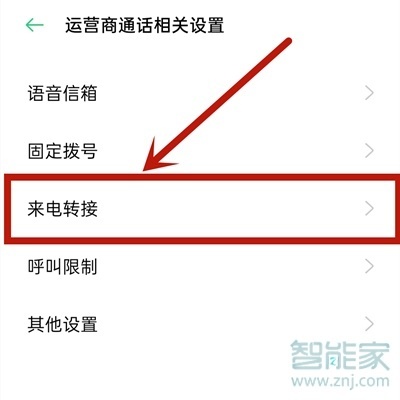
3、点击【来电转接】,
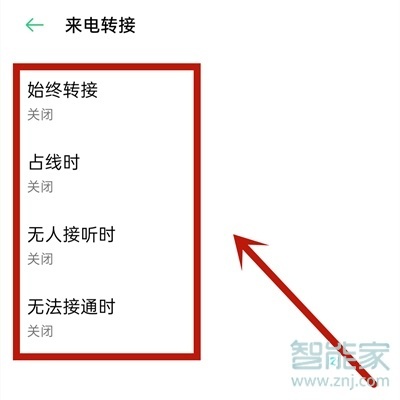
4、进入后即可对呼叫转移进行设置。
以上就是乐呵呵网小编给大家带来的关于“opporeno5pro怎么设置呼叫转移”的全部内容了,了解更多智能资讯尽在乐呵呵网(m.rkxy.com.cn)!