华为nova8pro是一款曲面屏手机,因此手机侧面也会显示内容,有些朋友觉得这样看着不方便,那么nova8pro怎么关闭左右扩展呢?
品牌型号:华为nova8pro
系统版本:EMUI11
nova8pro怎么关闭左右扩展1、打开手机设置,点击【显示和亮度】,
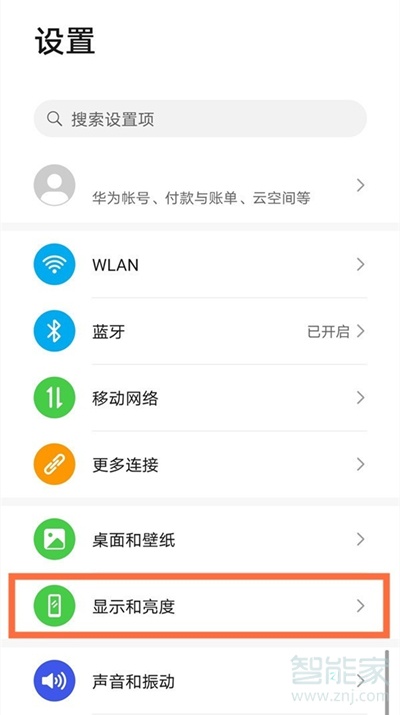
2、点击【更多显示设置】,

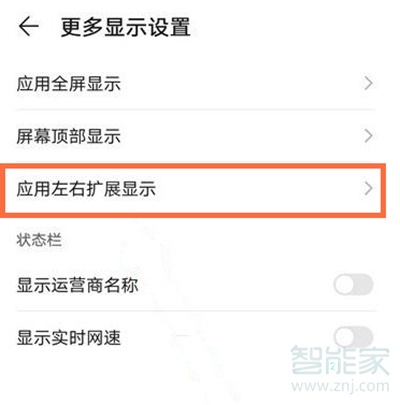
3、点击【应用左右扩展显示】,
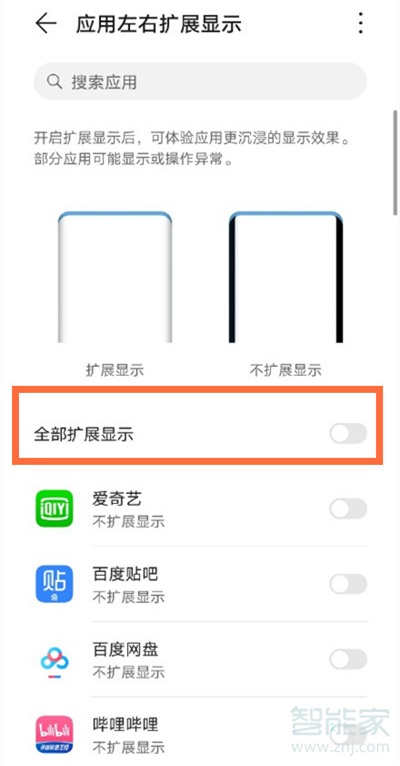
4、将【全部扩展显示】右侧按钮关闭即可。
以上就是乐呵呵网小编给大家带来的“nova8pro怎么关闭左右扩展”的全部内容,了解更多智能资讯尽在乐呵呵网!(m.rkxy.com.cn)