问题描述
今天使用girhub的pages功能搞了一个blog,用了github提供的主题,当我将其git clone下来的时候,出现:
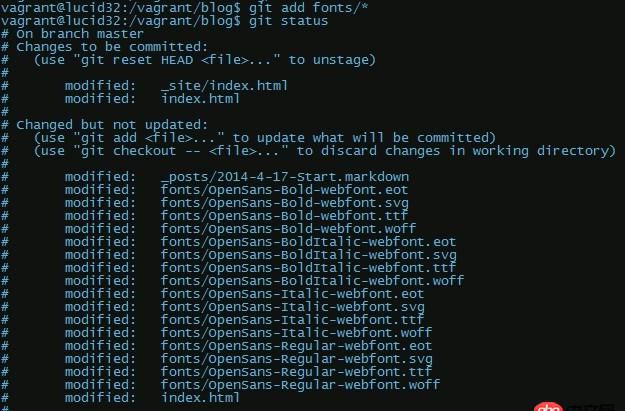
# On branch master# Changed but not updated:# (use 'git add <file>...' to update what will be committed)# (use 'git checkout -- <file>...' to discard changes in working directory)## modified: fonts/OpenSans-Bold-webfont.eot# modified: fonts/OpenSans-Bold-webfont.svg# modified: fonts/OpenSans-Bold-webfont.ttf# modified: fonts/OpenSans-Bold-webfont.woff# modified: fonts/OpenSans-BoldItalic-webfont.eot# modified: fonts/OpenSans-BoldItalic-webfont.svg# modified: fonts/OpenSans-BoldItalic-webfont.ttf# modified: fonts/OpenSans-BoldItalic-webfont.woff# modified: fonts/OpenSans-Italic-webfont.eot# modified: fonts/OpenSans-Italic-webfont.svg# modified: fonts/OpenSans-Italic-webfont.ttf# modified: fonts/OpenSans-Italic-webfont.woff# modified: fonts/OpenSans-Regular-webfont.eot# modified: fonts/OpenSans-Regular-webfont.svg# modified: fonts/OpenSans-Regular-webfont.ttf# modified: fonts/OpenSans-Regular-webfont.woff# no changes added to commit (use 'git add' and/or 'git commit -a')
按理说应该执行git add . 然后接着再git commit -m 'messages'就行了,但是,在我每次要提交的时候,都会出现Changed but not updated:, git status时候也总是输出上面的信息,虽说没多大影响,但看了这么多没提交上去的东西真的很不舒服,求解决...
问题解答
回答1:试试 git add -A
这个目录貌似都是一些字体相关,如果不在意的话,直接 git checkout . 试试。git checkout . 只对当前目录下的文件有效,所有先换到正确的目录下再操作。
回答2:Try git commit -am blahblah
回答3:你需要先执行git add步骤,简单地说就是运行这个命令:
git add .
稍微解释一下:提示“Changed but not updated”这部分的文件并没有加到Git缓冲区里。想要了解的更清楚,去读读《Pro Git》或者《Git权威指南》吧。